
PAeDocket
Supreme Court of PennsylvaniaBooks & Reference
3.9376.00 Reviews
- Version
- 1.4
- Installs
- 500.00K
- Age Rating
- Everyone
Screenshots
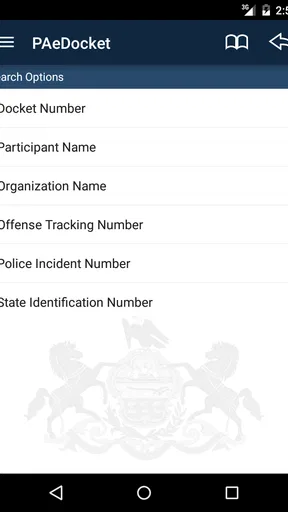
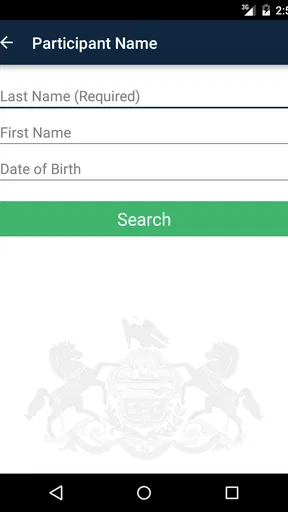
Our Review of PAeDocket
 Analysis by Appyee
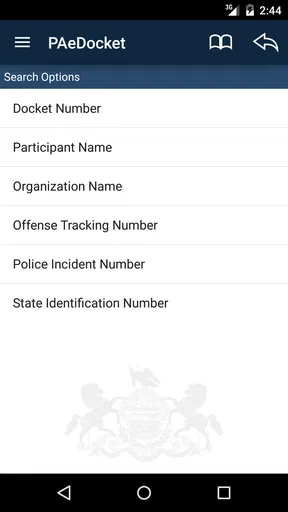
When I need to check a Pennsylvania court case away from a desktop, I find PAeDocket most useful as a focused reference tool rather than a general legal app. It is a free Books & Reference app from the Supreme Court of Pennsylvania, built around searching Pennsylvania court cases from a mobile device. That narrow purpose is its biggest strength: I can open it with a specific case-search task in mind instead of sorting through unrelated legal material.
The first thing to understand is what kind of experience this is. It is not designed to replace legal advice, explain every court procedure, or turn a complicated dispute into plain language. Its value is more practical. If I want to look up a docket while speaking with someone, confirm that I am checking the right Pennsylvania matter, or begin researching a case before returning to a larger screen, the app gives me a convenient starting point.
Getting from installation to a useful search
I find the first search works best when I treat it as a careful identification task, not a quick guess: I gather the clearest case details I have, then compare the result with that context before relying on it. That small routine helps me distinguish a useful match from a familiar name and makes the next step—whether a conversation or further research—more deliberate.
What to expect before opening it
PAeDocket is an established app, released in August 2015, and its current version is 1.4. It supports devices running Android 5.0 or later. The app has passed half a million installs and holds an average rating of 3.9 from around 1,300 ratings, which suggests a reasonably useful but not universally smooth experience. I would read that combination as a sign of a practical public-service tool: people install it for a particular reason, while some users may expect more polish or broader legal functionality than it intends to provide.
The age rating is Everyone, and the app is free to use. Those details make it approachable for a first-time user who simply needs to perform a case search without committing to a subscription. Still, “free” should not be confused with “simple in every situation.” Court terminology can be unfamiliar, and a search result may require careful interpretation. The app can help me locate information, but it does not remove the responsibility to check names, case details, and context carefully.
I also think it is important to set expectations about speed and purpose. A mobile court-search tool is most valuable when I already have a reason to search. It is less satisfying as a casual browsing app because legal records are not organized like a news feed or a library of readable articles. If I install it expecting explanations, commentary, or guided legal education, I am likely to feel that it is limited. If I treat it as a direct route to a Pennsylvania docket search, its design makes much more sense.
Starting with the right information
My first recommendation is to gather the identifying details I already have before launching a search. A person's name, a case number, or another precise piece of case information is more useful than a vague description of an event. This is one of the less obvious ways to avoid frustration: the app may be easy to open, but the quality of the result depends heavily on how accurately I frame the search.
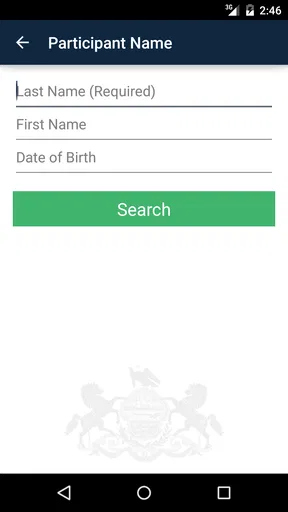
Names can create confusion. Common names may produce several possible records, while spelling differences can make a relevant case harder to recognize. I would not assume that the first familiar-looking result is automatically the correct one. Instead, I would compare the available case information with what I already know and keep an eye out for details that distinguish one matter from another.
A second useful habit is to separate “finding a case” from “understanding a case.” The first task is a search problem. The second may require reading court documents, asking a qualified professional, or checking information through another official channel. Keeping those tasks separate prevents a common mistake: treating the presence of a search result as proof that I have understood the legal status or significance of the matter.
The first meaningful action
For a first session, I would choose one concrete goal: locate a known Pennsylvania case. I would enter the most precise information available, review the returned possibilities, and verify that the selected record matches the person or matter I intended to find. That sequence is more reassuring than opening the app and trying random searches, because it gives me a clear definition of success.
A realistic example would be checking a case while away from a computer. Suppose I am speaking with a family member who has a Pennsylvania court matter and wants to confirm that we are discussing the same record. I can use the app as a quick reference point, compare the result with the information the family member provides, and then decide whether the next step requires a fuller review elsewhere. The benefit is not that the phone replaces the entire legal process; it is that the first verification step is close at hand.
Another useful scenario is preparing for a conversation with an attorney or court office. I can search for the relevant docket before the conversation, note the identifying information shown by the result, and avoid relying entirely on memory. That can make the discussion more organized. I would still treat the app as a preparation aid rather than as an official interpretation of what I should do next.
The most important practical tip is to slow down after the search returns something plausible. Mobile screens encourage quick tapping, and legal records can contain similar names or related matters. I prefer to verify the result twice before sharing it with someone else. That small pause is a meaningful trade-off: the app saves time during the lookup, but accuracy still depends on my attention.
Where first-time users may hesitate
The main source of confusion is likely to be the difference between a case search and a legal explanation. A docket-oriented result can help identify a proceeding, but it may not answer questions such as what a filing means in everyday language, what deadline applies to a person, or whether a particular action is advisable. When I reach one of those questions, I stop treating the app as the final authority and move to an appropriate legal or court-information resource.
Another point of friction is search precision. If I use incomplete information, I may have to sort through results or reconsider whether I entered the details correctly. That is not necessarily a flaw in the concept of the app, but it does affect the first-use experience. I would keep the spelling of names consistent, avoid guessing when I have a case number available, and record the details of the result I actually selected.
Users may also wonder whether the app is suitable for every Pennsylvania court question. I see it as a targeted search utility, not a universal directory for every legal need. Someone who wants legal news, case commentary, document drafting, attorney discovery, or step-by-step guidance will probably need another service alongside it. A general web search may be better for background reading, while a full desktop workflow may be better for comparing several records and documents at once.
That comparison with usual alternatives helps define its place. Searching the web can be faster for broad questions, but results may mix official information with commentary and unrelated pages. A desktop browser can offer more room for reviewing details, but it is less convenient when I am already using a phone. PAeDocket sits between those options: it is more focused than a general search engine and more portable than a desktop session, although its narrow focus means it cannot replace either one for every task.
How I would use it beyond the first search
After a successful lookup, I would use the result as a reference point for a more deliberate workflow. First, I would write down the identifying information that confirms I found the intended matter. Next, I would note what question remains unanswered. Is the goal simply to confirm that a case exists, to prepare for a conversation, or to understand a procedural development? Each goal calls for a different next step, and the app is most effective when I do not ask it to solve all three.
This approach is especially helpful for people who are helping someone else. A relative, volunteer, student, or administrative worker may need to locate a record without being the person involved in the case. In that situation, I would avoid making assumptions based only on a matching name. I would ask for enough identifying context to distinguish the matter, then use the app for the lookup rather than presenting a quick search as a complete legal conclusion.
There is also a useful privacy-minded habit here, even without turning the app into a security discussion: I would avoid casually sharing screenshots or case details in group chats. Court information can involve real people and sensitive circumstances. The app makes access convenient, so I think the user should match that convenience with care about where the resulting information goes.
For repeat use, I would keep expectations modest. This is not the kind of application I would open every day for entertainment or general reading. Its value appears when a specific Pennsylvania case-search need arises. That can still be significant. A tool does not need frequent daily use to be worthwhile if it removes a difficult step at the moment it matters.
Who will appreciate it most
I would recommend PAeDocket to Pennsylvania residents, families, students, administrative users, and anyone who occasionally needs a convenient mobile route to a Pennsylvania court case search. It is particularly suitable for a first lookup when I have identifying information ready and want to work from a phone. The free price also makes it easy to try without a financial barrier.
I would be more cautious about recommending it as the primary tool for legal professionals who need a large-screen research workflow, extensive document handling, or broader case analysis. The same applies to someone who wants plain-English legal education rather than a focused search utility. In those situations, a desktop browser, a specialized legal research platform, or direct guidance from a qualified professional may be a better fit.
The app is also not the right choice for anyone who expects a search result to tell them what decision to make. A court record and legal advice are different things. I appreciate PAeDocket more when I use it to establish a factual starting point and then choose the right source for interpretation.
My final take after using it as a reference tool
PAeDocket succeeds because it keeps its purpose clear: helping me perform a Pennsylvania court case search from a mobile device. The Supreme Court of Pennsylvania is the developer, and that official focus gives the app a practical role that a random web result cannot fully duplicate. Its free access, Everyone rating, and support for older Android devices also make it approachable for a broad group of users.
At the same time, I would not describe it as a complete legal companion. The experience depends on entering useful identifying information, checking results carefully, and knowing when a search has reached its limit. Its 3.9 average rating reflects that middle ground well: helpful for the task it targets, but not necessarily polished or broad enough for every expectation.
My recommendation is simple: install it when you need a focused Pennsylvania case lookup, not when you are looking for legal advice or a full research suite. For a first-time user, the path is reassuringly concrete: prepare the case details, search for one known matter, verify the result, and use that information to decide what should happen next. In that role, this free reference app earns a place on my phone for those occasional but important moments when a court record needs to be checked quickly.
Verdict
Strengths of PAeDocket
- Search federal court cases by party name, case number, or court.
- Provides access to docket entries and many publicly available case documents.
- Useful filters help narrow results by court and filing information.
- Official court data improves confidence in the accuracy of case details.
- Convenient mobile access for checking cases while away from a computer.
Limitations of PAeDocket
- Document availability varies, and some filings may be restricted or missing.
- PACER fees may apply when opening or downloading certain documents.
- The interface can feel dated and less intuitive for first-time users.
- Search results may require precise information to locate the correct case.
- Not a substitute for legal advice or complete access to every court record.
Similar Picks in This Category
View All
Google Play Books & Audiobooks
Google LLC4.7

네이버 - NAVER
NAVER Corp.3.5

Wattpad - Read & Write Stories
Wattpad.com3.7

King James Bible - Verse+Audio
Ozion4.8

Bible Offline-KJV Holy Bible
Bíblia Offline4.9

Amazon Kindle: Reading App
Amazon Mobile LLC4.8
Frequently Asked Questions
What is PAeDocket, and what can I use it for?
PAeDocket is Pennsylvania’s official mobile and web-based court docket search service. After testing its search tools, we found that users can look up publicly available case information from participating Pennsylvania courts, including civil, criminal, family, and magisterial district court matters. It is mainly designed for checking docket entries, case status, filing activity, and basic scheduling information rather than replacing formal legal documents or advice.
How do I search for a case in PAeDocket?
PAeDocket generally allows searches using information such as a participant’s name, docket number, or other case-specific details, depending on the court and record type. In practice, entering accurate spelling and selecting the correct county or court can make a significant difference. Broad searches may return many results, so having a docket number or additional identifying information usually produces faster and more reliable results.
Is all Pennsylvania court information available through PAeDocket?
No. PAeDocket does not guarantee access to every court record or every detail in a case. Availability depends on the court, record type, privacy restrictions, publication rules, and system updates. Some cases may be sealed, confidential, limited by law, or unavailable through the public search service. Users should also expect that recently filed documents or docket changes may take time to appear.
Can I rely on PAeDocket information as an official legal record?
PAeDocket is a useful public information tool, but the displayed results should not automatically be treated as a certified copy, legal notice, or complete official record. Docket information can change, contain limited descriptions, or omit documents that require a formal request. If the information affects a deadline, court appearance, legal filing, or important decision, verify it with the appropriate Pennsylvania court or a qualified legal professional.
Is PAeDocket free, and is it safe to use?
PAeDocket is intended to provide public access to Pennsylvania court docket information without requiring users to pay simply to perform a basic search, although fees may apply for certified copies, document retrieval, or services handled separately by a court. For safety, use the official PAeDocket service or an authorized app listing, avoid submitting unnecessary personal information, and remember that search results may contain sensitive case-related details.
